문제발생
RxDataSource로 구현한 TableView Cell내부에 더보기(...)버튼이 있습니다.
해당 버튼을 클릭하면 바텀시트가 올라오도록 바인딩했습니다.
바텀시트의 운동정보 변경 버튼을 누르면 편집 창이 modal형식으로 뜨고 이를 편집하고 저장하면 다시 리스트페이지로 돌아오게됩니다.
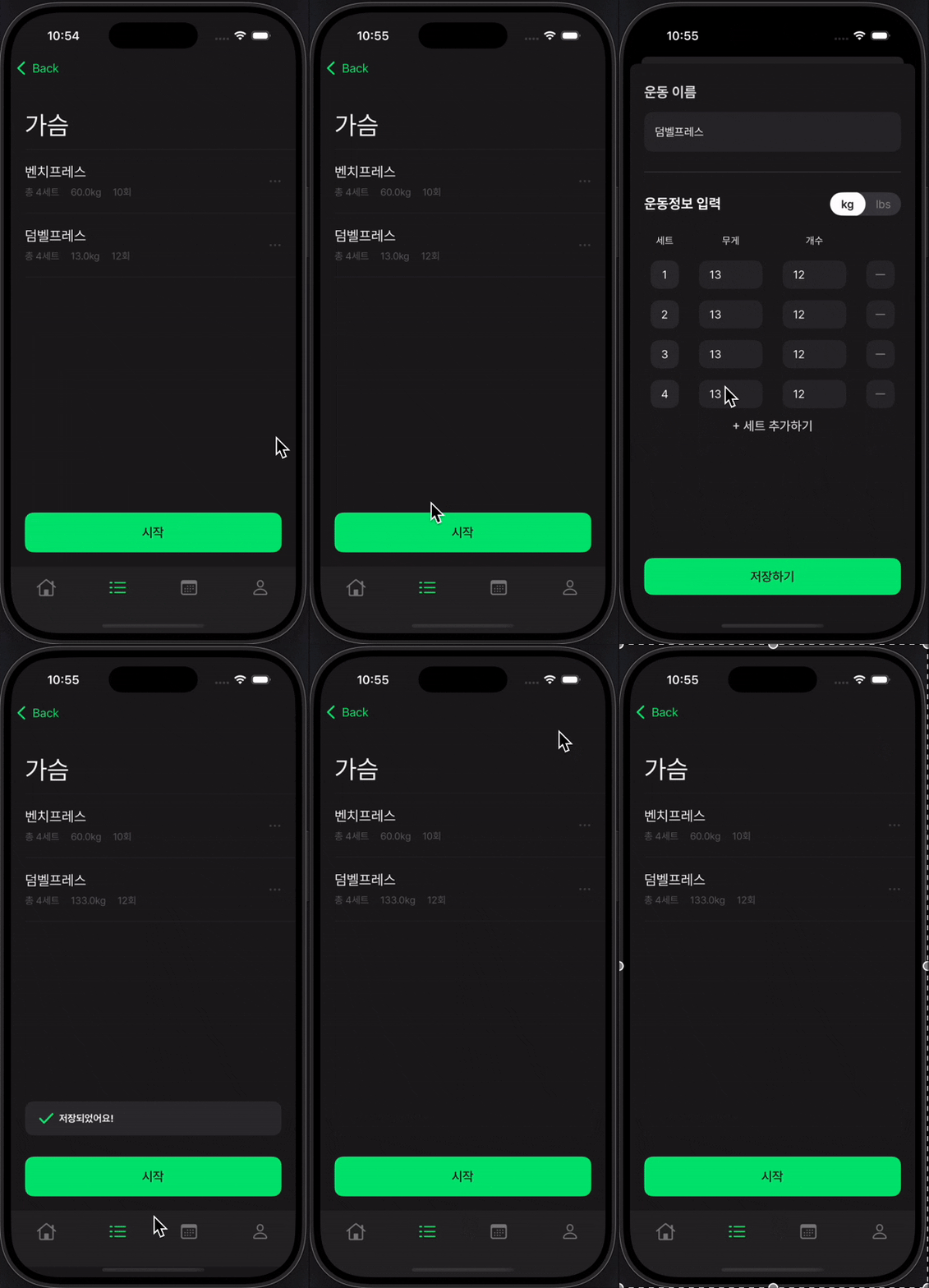
- 문제는 리스트 페이지로 돌아오면 셀의 더보기 버튼을 눌러도 반응하지 않았습니다.
문제 분석
func bind() {
    rxDataSource = DataSource(
        configureCell: { (dataSource, tableView, indexPath, item) in

            // 셀, 헤더, 푸터 등록
            tableView.register(EditRoutineTableHeaderView.self,
                               forHeaderFooterViewReuseIdentifier: EditRoutineTableHeaderView.identifier)
            tableView.register(EditRoutineTableFooterView.self,
                               forHeaderFooterViewReuseIdentifier: EditRoutineTableFooterView.identifier)
            tableView.register(EditRoutineTableViewCell.self,
                               forCellReuseIdentifier: EditRoutineTableViewCell.identifier)

            // 셀 구성
            guard let cell = tableView.dequeueReusableCell(
                withIdentifier: EditRoutineTableViewCell.identifier,
                for: indexPath
            ) as? EditRoutineTableViewCell else {
                return UITableViewCell()
            }
             cell.moreButtonTapped
                    .subscribe(with: self) { owner, _ in
                        owner.cellMoreButtonTapped.accept(indexPath)
                    }.disposed(by: cell.disposeBag)

            cell.configure(indexPath: indexPath,
                           model: item,
                           caller: self.caller)
            cell.selectionStyle = .none
            return cell
        })
    rxDataSource?.canMoveRowAtIndexPath = { _, _ in return true }
}
RxDataSource를 구성하는 부분에서 셀 내부 버튼 subscribe를 해주었고, 처음 셀에 진입했을 때는 버튼이 작동했습니다.
편집창에서 운동을 편집하지 않고 dismiss 해도 버튼이 작동되는가? -> 잘 작동됨
편집창에서 운동을 편집하고 저장해서 dismiss되면 버튼이 작동되는가? -> 작동하지 않음
운동을 편집하고 저장하면 문제가 생기는걸 알았고 버튼이 Rx바인딩 되었기 때문에 구독이 해제됬을 꺼라 생각했습니다.
그래서 디버깅 코드를 넣어서 해제시점을 찾아보았습니다.
cell.moreButtonTapped
    .do(onDispose: {
        print("cell.moreButtonTapped dispose") // 해제되면 프린트
    })
    .subscribe(with: self) { owner, _ in
        owner.cellMoreButtonTapped.accept(indexPath)
    }.disposed(by: cell.disposeBag)
프린트되는 시점을 확인해보니 정확히 운동 편집후 저장하기를 눌러서 dismiss되는 시점에 해제된걸 알 수 있었습니다.
해제된 버튼은 다시 구독되지 않았고, 구독되지 않은 버튼은 클릭해도 반응이 없었습니다.
// Reactor reduce
func reduce(state: State, mutation: Mutation) -> State {
    var newState = state
    switch mutation {
    case .loadWorkout(let routines):
        print("routines: \(routines)\n\n")
        if let uid {
            routines.forEach { routine in
                if routine.documentID == currentState.routine.documentID {
                    newState.routine = routine
                }
            }
        } else {
            routines.forEach { routine in
                if routine.rmID == currentState.routine.rmID {
                    newState.routine = routine
                }
            }
        }
......
.....

// VC에서 state 구독
reactor.state
    .compactMap{ $0.routine }
    .distinctUntilChanged()
    .observe(on: MainScheduler.instance)
    .subscribe(with: self) { owner, item in
        owner.tableView.apply(routine: item)
    }.disposed(by: disposeBag)
편집된 운동이 바로 적용될 수 있도록 ReactorKit의 State가 변경되면 바로 UI에 반영되도록 구현되어 있었습니다.
운동이 편집되니 TableView의 apply가 실행되었고, 이 과정에서 기존의 버튼이 구독이 해제되었습니다.
Apply를 실행해도 RxDataSource의 ConfigureCell 클로저가 재실행되는거 아닌가요?
위 문장처럼 저는 apply를 통해 새로운 데이터를 바탕으로 테이블뷰를 업데이트해도 ConfigureCell이 재실행되면서 재구독을 해줄꺼라 생각했습니다.
근데 맞습니다. ConfigureCell 클로저가 각 IndexPath마다 실행되는건 맞습니다 다만 구독의 방식이 올바르지 못했는데요.
기존의 버튼 구독방식은 다음과 같았습니다.
final class EditRoutineTableViewCell: UITableViewCell {

    var disposeBag = DisposeBag()
    var moreButtonTapped = PublishRelay<Void>() // 버튼은 Private으로 구성했기에
    											// 이벤트 방출은 internal로 구성
    ...
    ...

    override init(style: UITableViewCell.CellStyle, reuseIdentifier: String?) {
        super.init(style: style, reuseIdentifier: reuseIdentifier)
        setupUI()
    }

    func setupUI() {
        setAppearance()
        setViewHierarchy()
        setConstraints()
        bind() // 구독
    }

    func bind() {
        moreButton.rx.tap
            .bind(to: moreButtonTapped)
            .disposed(by: disposeBag)
    }
 }
해당 셀이 초기화되는 시점에 바인딩을 하도록 구현했기에 루틴페이지에 접근했을땐 버튼이 잘 작동되었습니다.
편집이 완료되고 데이터가 새롭게 불러와졌을 때, Cell의 init에 작성된 bind()가 호출되지 않았습니다.
셀이 재사용되면서 deinit되지 않았습니다.
그래서 바꾼 구독방식
// VC로 보내줄 PublishRelay
private(set) var cellMoreButtonTapped = PublishRelay<IndexPath>()

// TableView의 RxDataSource configureCell
func bind() {
    rxDataSource = DataSource(
        configureCell: { (dataSource, tableView, indexPath, item) in

            // 셀, 헤더, 푸터 등록
            tableView.register(EditRoutineTableHeaderView.self,
                               forHeaderFooterViewReuseIdentifier: EditRoutineTableHeaderView.identifier)
            tableView.register(EditRoutineTableFooterView.self,
                               forHeaderFooterViewReuseIdentifier: EditRoutineTableFooterView.identifier)
            tableView.register(EditRoutineTableViewCell.self,
                               forCellReuseIdentifier: EditRoutineTableViewCell.identifier)

            // 셀 구성
            guard let cell = tableView.dequeueReusableCell(
                withIdentifier: EditRoutineTableViewCell.identifier,
                for: indexPath
            ) as? EditRoutineTableViewCell else {
                return UITableViewCell()
            }


            cell.configure(indexPath: indexPath,
                           model: item,
                           caller: self.caller)
            cell.bind(indexPath: indexPath,
                      relay: self.cellMoreButtonTapped)
            // ConfigureCell은 각 셀의 IndexPath마다 재실행되므로
            // Cell의 bind메서드를 호출하도록 구현
            // bind메서드에는 이벤트 구독 코드
            cell.selectionStyle = .none
            return cell
        })
    rxDataSource?.canMoveRowAtIndexPath = { _, _ in return true }
}


final class EditRoutineTableViewCell: UITableViewCell {

    var disposeBag = DisposeBag()
    ...
    ...
    // init내부에 있던 bind를 지우고 메서드로 구현
    func bind(indexPath: IndexPath, relay: PublishRelay<IndexPath>) {
        moreButton.rx.tap
            .map{ indexPath }
            .bind(to: relay)
            .disposed(by: disposeBag)
    }
 }
이전처럼 각 셀 IndexPath마다 호출되는 ConfigureCell에 bind메서드를 호출하도록 구현했고
Cell에서는 생성시(Init)에만 바인딩하던 코드를 bind메서드 호출마다 구독할 수 있도록 수정하였습니다.
'RxSwift' 카테고리의 다른 글
| RxSwift URLSession (1) | 2024.07.18 |
|---|
